
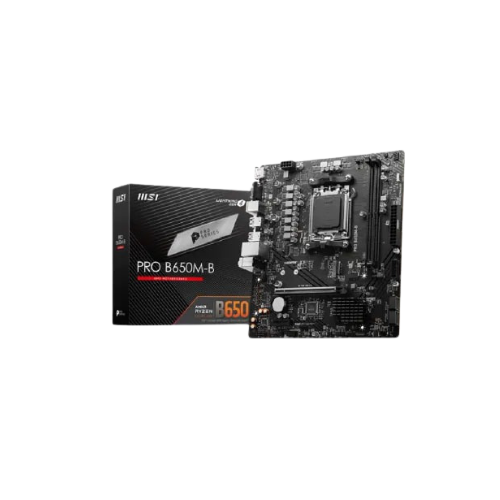


MSI PRO B650M-B DDR5 AMD AM5 m-ATX Motherboard
Original price was: 13,500৳ .13,300৳ Current price is: 13,300৳ .
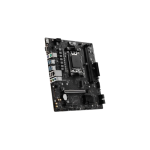
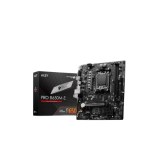
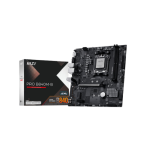
The MSI PRO B650M-B DDR5 AMD AM5 m-ATX Motherboard is a compact and feature-rich motherboard designed for AMD Ryzen 7000-series CPUs. It uses the AM5 socket and supports DDR5 memory. It’s a great pick for everyday use, school, home workstations, or office PCs. It has fast speeds, stable power, and strong build quality. You can play light games, run many apps, or stream videos. It also supports modern storage and gives room for upgrades. This board is part of MSI’s Pro Series, built for users who want good value without missing key features.
Specs Table – MSI PRO B650M-B DDR5 AM5 mATX
| Feature | Details |
|---|---|
| Socket | AM5 |
| CPU Support | AMD Ryzen 7000 Series (Zen 4) |
| Chipset | AMD B650 |
| Form Factor | Micro-ATX (mATX) |
| Memory Type | DDR5 |
| RAM Capacity | 2 × DDR5 slots, up to 96GB, up to 6400+ MHz (OC) |
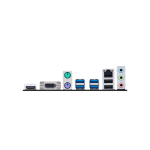
| Graphics Ports | 1 × HDMI 2.1, 1 × DisplayPort 1.4 |
| Expansion Slots | 1 × PCIe 4.0 x16, 2 × PCIe 3.0 x1 |
| Storage Options | 1 × M.2 Gen 4 x4, 4 × SATA III |
| USB Ports | USB 3.2 Gen 1, USB 2.0, USB-C header (front panel) |
| Networking | Realtek 1 Gbps Ethernet |
| Audio Codec | Realtek ALC897 7.1-Channel HD Audio |
| BIOS | Click BIOS 5, Flash BIOS Button |
| Special Features | Core Boost, Audio Boost, TPM Support, Steel PCIe Slot, EZ Debug LED |
Supports Latest AMD Ryzen Processors
The board supports AMD Ryzen 7000 processors. These are fast and great for multitasking. You get strong power and smooth use, even during heavy work. It uses the AM5 socket, which lets you add newer parts later. This helps keep your PC ready for the future.
Fast DDR5 RAM, Up to 96GB
The board supports the latest DDR5 memory. It gives faster speeds, better power use, and stronger performance than DDR4.
You get:
- 2 memory slots
- Up to 96GB RAM
- Up to 6400+ MHz speed (overclocked)
This means quick boot-up, fast app launches, and smooth multitasking.
Built-In Graphics Support with HDMI + DisplayPort
If your Ryzen CPU has integrated graphics, you don’t need a graphics card right away.
This board gives you:
- 1 x HDMI 2.1 port
- 1 x DisplayPort 1.4 port
These ports allow easy monitor connections. You can plug in a monitor and start using your PC fast.
Ready for Graphics Cards and Add-Ons
You get:
- 1 x PCIe 4.0 x16 slot – for a full-size graphics card
- 2 x PCIe 3.0 x1 slots—for extras like sound or Wi-Fi cards
The steel slot keeps your graphics card safe and holds strong even after many changes.
M.2 and SATA Storage Support
You get:
- 1 x M.2 SSD slot (PCIe Gen 4 x4)
- 4 x SATA III ports
The M.2 slot is fast. It lets you use modern NVMe SSDs. Games and apps load in seconds. SATA ports help you add more storage later for files, photos, or media.
Plenty of USB Ports
This board supports:
- USB 3.2 Gen 1 – for fast data
- USB 2.0 – for mouse and keyboard
- USB-C header—on the front panel of your case
You can use USB drives, charge your phone, or plug in the game gear without any problems.
Fast, Stable Internet
The Realtek Gigabit LAN chip gives you:
- Fast wired speeds
- Strong and safe network connection
- Smooth video calls and stable downloads
This is perfect for both work and fun.
High-Quality Audio
The board uses the Realtek ALC897 audio chip. It supports:
- 7.1-channel surround audio
- Clear sound with less noise
- Enhanced bass and rich music output
Audio Boost makes your sound sharper when using headphones or speakers.
Easy BIOS—Update without CPU
The MSI BIOS is
- Simple to read
- Easy to use
- Great for first-time builders
It also includes a Flash BIOS button. This helps you update your BIOS using just a USB stick. You don’t even need a CPU or RAM installed. This is perfect when adding new parts that need the latest BIOS.
Debug LED Helps Solve Problems Fast
The EZ Debug LED clearly shows system errors. Each LED label (CPU, RAM, GPU, Boot) lights up when there are problems. It’s super helpful when your PC won’t start or shows a black screen. It saves time in finding the fix.
Strong Build with Useful Extras
The board includes smart design features like
- Core Boost for better power delivery to your CPU
- TPM support, needed for Windows 11 security
- Steel PCIe slot to protect heavy graphics cards
These make your PC last longer and work better.
Best For:
This motherboard is a perfect pick for:
- 🎓 Students
- 👨💻 Office users
- 🧑🔧 Beginners building a PC
- 🏠 Home use
- 🎮 Casual or light gamers
It offers solid features, a long life, and a good price.
If you’re not doing high-end gaming or editing, this board gives everything you need.
Pros and Cons
Pros:
- Supports fast Ryzen CPUs
- DDR5 RAM gives high speed
- PCIe 4.0 for GPU and SSD
- Easy BIOS updates with Flash Button
- Strong LAN and good sound
- Debug LEDs show errors fast
Cons:
- No built-in Wi-Fi
- Only 2 RAM slots
- Not made for heavy overclocking
Quick Recap – MSI PRO B650M-B
Let’s review the highlights:
- ✨ AM5 socket for Ryzen 7000
- 🚀 DDR5 RAM supports up to 96 GB.
- ⚙ PCIe 4.0 for GPU and M.2 drives
- 🎧 Realtek HD Audio with Audio Boost
- 🌟 HDMI + DisplayPort for CPU graphics
- 🧠 Easy-to-use BIOS
- 🔧 Flash BIOS ready (no CPU or RAM needed)
- 🧩 Debug LEDs for simple error checks
- 🔒 Windows 11 ready with TPM 2.0
Final Thoughts—Worth It?
The MSI PRO B650M-B is a great choice if you want a modern AMD system that works well without spending too much. It gives you new tech, fast speeds, and room to grow. It’s easy to install, simple to use, and strong enough for everyday or office work. If you’re building a new PC and want value, speed, and support for the Ryzen 7000 line, this board is hard to beat.



Reviews
There are no reviews yet.